Have you ever found yourself locked out of your email, staring at the login page, filled with frustration and nostalgia? An old Gmail account can hold precious memories—important emails, cherished photos, or even forgotten subscriptions. Reclaiming access to that digital treasure trove is essential.
Whether you’ve switched devices, changed phone numbers, or simply forgot your password over time, recovering an old Gmail account doesn't have to be a daunting task. With a bit of guidance and persistence, you can regain control of your email inbox and all the valuable content it contains. Let's explore how to navigate this process smoothly and efficiently!
Step 1: Trying to access the account through the Gmail login page
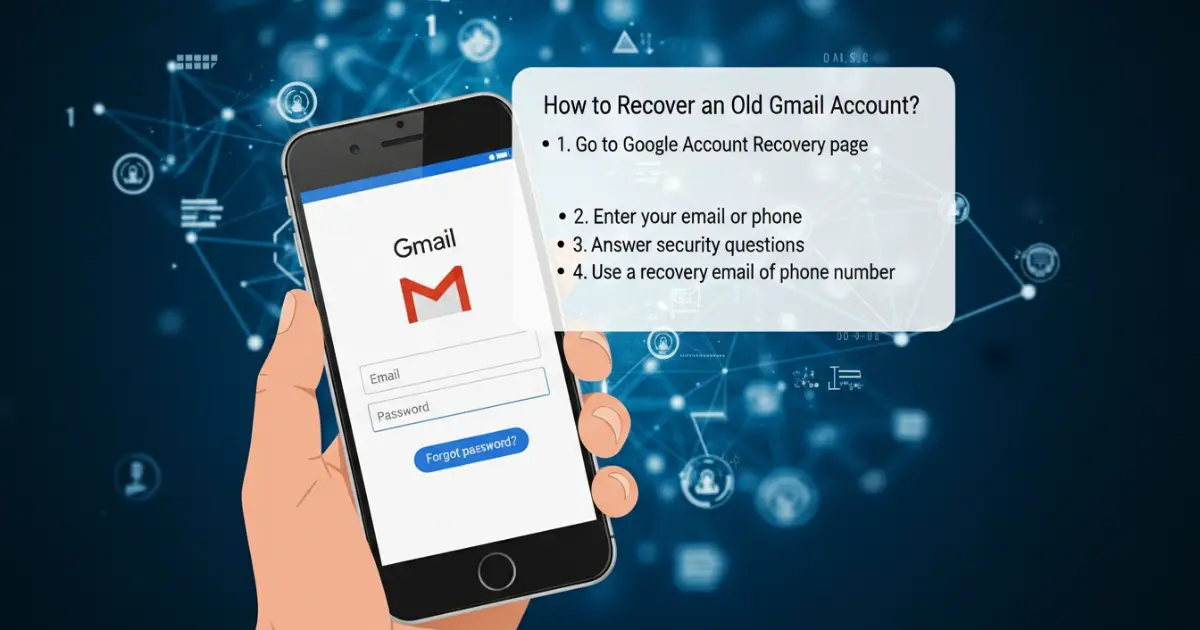
The first step in recovering your old Gmail account is simply trying to log in. Head over to the Gmail login page and enter your email address.
If you remember your password, type it in. If not, don't worry—there's still hope. Click on “Forgot password?” This option will guide you through the recovery process.
If you're able to access another Google service like YouTube or Google Drive with this account, try logging in there too. Sometimes it can be easier if you're already signed into other platforms.
Keep an eye out for any prompts that might ask about recent activity or devices used to sign in. These questions help verify your identity and could give you a clearer path forward as you proceed with recovery efforts.
Step 2: Using the Google Account Recovery page
If you can’t access your account through the Gmail login page, it’s time to turn to the Google Account Recovery page. This resource is designed specifically for situations like yours.
Once you're on the recovery page, enter your email address. Be sure it's the one linked to that old account. Click "Next" and follow the prompts carefully.
Google will ask questions about your previous sign-in attempts or any recovery details you've set up before. Answer these as accurately as possible; this information helps verify your identity.
If you don’t remember specifics, don’t worry. Just proceed with what you recall. The system tries its best to assist users in reclaiming their accounts without too much hassle.
Keep an eye out for any security notifications sent to associated devices or emails during this process, as they may provide additional guidance or verification steps needed for recovery.
Step 3: Providing necessary information for verification
Once you reach the verification stage, it’s crucial to provide accurate information. Google needs this data to confirm your identity.
You might be asked for details like the last password you remember or answers to security questions. Think carefully before answering; even small errors can hinder your recovery process.
If you signed up for two-factor authentication, having access to that secondary method will also help speed things along. It’s essential for verifying ownership of your account securely.
Sometimes, Google may ask when you created the account or other related information. Be as precise as possible and provide any relevant dates if prompted.
Keep in mind that patience is key here—this part can take a bit of time depending on what information Google requires from you.
Step 4: Recovering the account through a recovery email or phone number
Once you’ve navigated through the initial recovery steps, it’s time to leverage your recovery options. If you've set up a recovery email or phone number in your account settings, Google will prompt you to use these during the process.
Check your email inbox for a verification code if you opted for an email option. This step is crucial. Enter that code on the designated page to prove ownership of your account.
If you choose SMS verification instead, make sure you have access to that phone. You’ll receive a text with instructions or a verification code shortly after initiating the request.
Follow those prompts carefully. Each detail matters when reclaiming access. Remember, having these recovery options pre-established can save you significant hassle later on and restore your connection quickly.
Step 5: Additional steps for advanced security measures
Once you've regained access to your old Gmail account, it's time to enhance its security further. Start by enabling two-factor authentication (2FA). This adds an extra layer of protection by requiring a second form of verification, such as a text message or authenticator app code.
Next, review your account activity regularly. Check for any suspicious logins or changes you didn’t make. Google provides features that allow you to manage devices connected to your account.
Consider updating your password if it hasn’t changed in a while. Choose something strong and unique—mix letters, numbers, and symbols for optimal security.
Lastly, keep recovery options updated. Ensure that the email addresses and phone numbers linked to your account are current. This will help streamline future recoveries if needed and safeguard against unauthorized access.
Tips for preventing future account recovery issues
To prevent future account recovery issues, start by keeping your recovery options current. Regularly update your recovery email and phone number. This ensures you have access whenever needed.
Enable two-factor authentication for an added layer of security. This extra step can protect your account from unauthorized access, making it harder for hackers to compromise it.
Create a strong password that combines letters, numbers, and special characters. Avoid using easily guessable information like birthdays or names. A robust password can significantly reduce the risk of someone gaining entry into your account.
Lastly, stay informed about phishing attempts. Be cautious when clicking on links in emails or messages claiming to be from Google. Verify the sender’s address before taking any action to safeguard your login details effectively.
Conclusion
Keep your Old Gmail account secure is essential in today’s digital age. Regularly updating your account information—such as recovery email addresses and phone numbers—is a crucial step that can prevent future access issues. When you change your contact details, it ensures you’ll receive alerts or updates if there are any sign-in attempts from unfamiliar devices.
Additionally, staying vigilant against hackers is equally important. Enable two-factor authentication to add an extra layer of security to your account. This means even if someone gets hold of your password, they won't be able to access your inbox without the second form of verification.
Regularly reviewing email activity helps ensure no unauthorized actions have taken place on your account. By taking these proactive measures, you'll not only increase the chances of easily recovering an old Gmail account but will also protect yourself from potential threats in the future.